


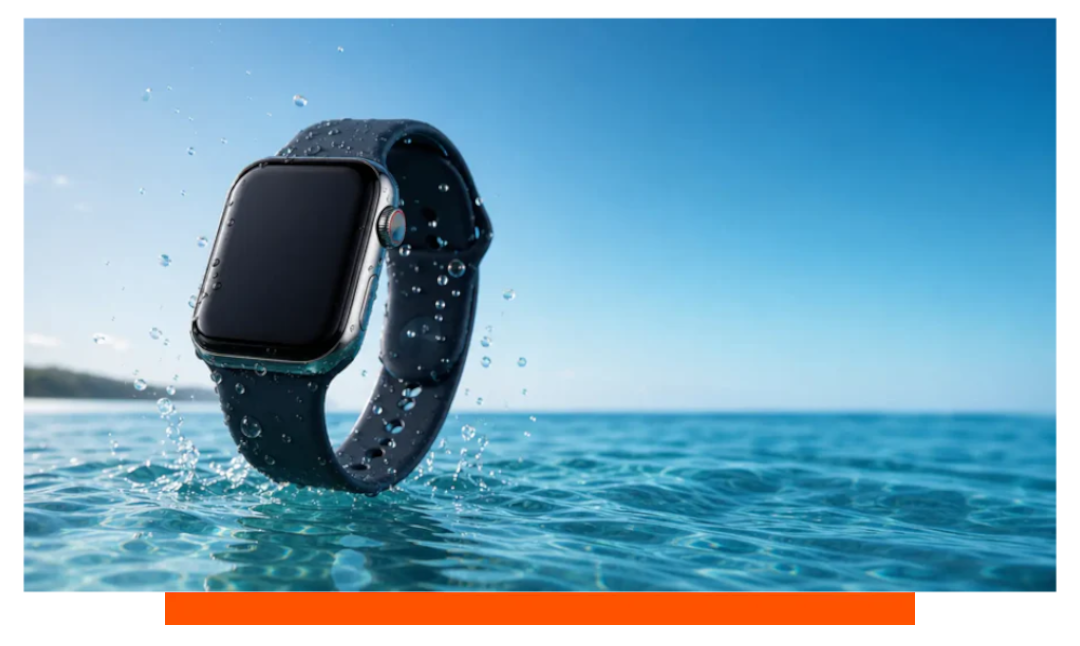
Yes - you can swim in the sea with Apple Watch 11. It is water resistant to 50 meters under ISO 22810:2010 and is suitable for shallow open-water swimming. It is not fully waterproof, so avoid high-velocity water, scuba, and deep free-diving, and always rinse away salt immediately after your swim.
What waterproof really means on Apple Watch 11
Apple Watch 11 is rated WR50, meaning water resistance to 50 meters under controlled laboratory tests. This rating covers splashes, rain, showering without soaps, pool laps, and open-water swimming in the ocean. It does not guarantee survival against high-impact waves, water jets, or prolonged deep submersion.
ISO 22810:2010 tests are static-pressure based, not surf-zone chaos. Dynamic pressure from a breaking wave can briefly exceed the equivalent of several atmospheres. That is why cliff jumps, ocean scooters, and high-speed watersports are excluded.
Can I wear Apple Watch in saltwater?
Yes, Apple explicitly lists ocean swimming among suitable activities for WR50-rated models like Apple Watch 11. However, seawater contains about 3.2 to 3.7 percent salt, which leaves conductive, corrosive residue. Salt crystals can creep into the speaker mesh, mic ports, and Digital Crown if you do not rinse promptly.
After every sea swim, rinse the watch under lightly running fresh water for 30 to 60 seconds. Rotate the Digital Crown while rinsing to flush out grains. Dry with a soft, lint-free cloth, and let any remaining moisture evaporate at room temperature.
Sea conditions and dynamic pressure
Choppy surf, shore breaks, and wipeouts create rapid pressure spikes far above calm-water conditions. Even if you never exceed 2 or 3 meters of depth, the impact of a wave can mimic much deeper pressures. Swim beyond the break or choose sheltered coves for gentler conditions.
Band and materials for saltwater
Fluoroelastomer and FKM rubber bands resist salt and UV well, while woven nylon dries quickly if rinsed. Avoid leather in saltwater, and rinse stainless steel bracelets thoroughly to prevent pitting. For durable, quick-drying options, see Apple Watch straps that suit open-water use. For example the Ocean strap is very popular for swimming and diving.
How to use Water Lock on Apple Watch?
Before you enter the water, open Control Center and tap the water droplet icon to enable Water Lock. Starting an Open Water Swim workout also engages Water Lock automatically, which disables touch input to prevent accidental taps. When you finish, rotate the Digital Crown firmly until the display says Unlocked, and the watch plays tones to eject water from the speaker.
When Water Lock helps and when it does not
Water Lock prevents phantom touches and triggers a brief speaker vibration sequence that pushes out droplets. It does not increase the watch's inherent water resistance or seal the microphones. Think of it as a usability and clearing aid, not a pressure-proofing mode.
Sea-swim suitability by model
While this guide focuses on Apple Watch 11, other current models are popular with sea swimmers. Apple Watch Ultra 2 offers higher water resistance for more rugged conditions. The table below summarizes key differences relevant to ocean use.
| Model | Water rating | Standard | Sea swimming | Not for | Notes |
|---|---|---|---|---|---|
| Apple Watch 11 | WR50 to 50 m | ISO 22810:2010 | Yes - shallow ocean | Scuba, high-velocity water | Rinse after all salt exposure |
| Apple Watch Ultra 2 | WR100 to 100 m | ISO 22810:2010, EN13319 | Yes - robust open water | Professional deep diving | Dive computer to 40 m with app |
| Apple Watch SE | WR50 to 50 m | ISO 22810:2010 | Yes - casual ocean | Scuba, water-skiing | Same rinse-and-dry best practices |
Open-water tracking accuracy and tips
Open-water distance relies on GPS, which intermittently loses signal when your arm is submerged. Expect 5 to 10 percent variance depending on stroke, chop, and shoreline multipath reflections. Calm seas, longer strokes, and occasional arm lift for sky view improve tracks.
GPS tips for coastal swims
- Use Open Water Swim
- Lift wrist for GPS lock
- Disable cellular to save
- Keep screen dimmer
- Auto-pause off for waves
Temperature, battery, and comfort in the ocean
Apple specifies 0 to 35 C as the acceptable ambient range for operation. Very cold water below 10 C can reduce battery life and stiffen band materials, while hot tropical shallows above 30 C may increase skin irritation. For long sessions, enable Low Power Mode and minimize screen wake.
Typical daily battery life is around 18 hours, with longer life in Low Power Mode. Continuous GPS swimming can draw faster than walking due to frequent signal reacquisition. Charging to 80 percent before heading to the beach offers a good buffer.
Care after saltwater swims
Post-swim maintenance is simple and crucial for longevity. Rinse thoroughly, eject water with Water Lock, and dry. Consider spares like extra charging cables or protective covers from Apple accessories for your beach bag.
- Rinse 30-60 seconds
- Remove band to rinse
- Dry with soft cloth
- Rotate crown while rinsing
- No heat or compressed air
Common mistakes to avoid
Do not press the side button or start depressing the Digital Crown underwater, except to clear water after finishing. Avoid soaps, shampoos, sunscreen directly on the watch - surfactants and solvents degrade seals. Never attempt to open the case, as water resistance is non-user-serviceable.
How the ocean affects materials
Salt accelerates crevice corrosion on metals and can harden elastomers over time. Frequent rinsing dramatically slows this wear, and periodic band replacement maintains comfort. UV exposure at the beach also ages materials, so store the watch out of direct sun when not in use.
Workout setup for sea swims
Use the Open Water Swim workout, set target distance or time, and enable haptics for splits. Configure heart rate alerts if you plan tempo intervals, noting that cold water reduces peripheral readings. Consider a snugger fit to stabilize sensors against sudden wave tugs.
FAQ
Is sea swimming damage covered by warranty?
Apple's warranty does not cover liquid damage. Water resistance is not a permanent condition, and seals can degrade with time, chemicals, or impacts. Treat the watch with care, and service it if you suspect damage.
Can I shower the watch after the sea?
Rinsing under fresh water is recommended, but avoid soaps, shampoos, and conditioners. These contain surfactants that can attack adhesives and seals. A plain fresh-water rinse and gentle dry are best.
Can I press buttons while underwater?
Avoid pressing the side button and do not force the Digital Crown underwater. Use Water Lock before swimming and unlock by turning the crown only after you are out of the water. This reduces the chance of pushing water past gaskets.
How long can I swim with GPS on?
Most users can record several hours of open-water swimming on a full charge. Expect shorter durations in cold water or with always-on display enabled. Low Power Mode and reduced haptics can extend tracking time.
Does Apple Watch measure distance accurately in chop?
Yes within reasonable limits, though chop and shoreline reflections add noise. Most swimmers see 5 to 10 percent error compared to measured buoys. Smoother strokes and brief wrist lifts for GPS lock improve accuracy.
Is Apple Watch 11 suitable for snorkeling?
Yes for casual snorkeling near the surface. Stay within shallow depths and avoid aggressive finning against strong currents that create high dynamic loads. Rinse the watch and band thoroughly after exiting the sea.
Will saltwater affect the speaker or microphones?
Salt can crust on meshes and mics if not rinsed. Water Lock helps expel droplets, but only fresh-water rinsing removes salt residue. If audio sounds muffled, rinse again and allow more drying time.
Conclusion
Yes - Apple Watch 11 is suitable for swimming in the sea, thanks to its WR50 rating under ISO 22810:2010. Keep it to shallow, recreational ocean swims, use Water Lock, avoid high-velocity impacts, and rinse thoroughly after every session. Follow these practices and your watch will handle beach days with confidence.


Leave a comment
All comments are moderated before being published.
This site is protected by hCaptcha and the hCaptcha Privacy Policy and Terms of Service apply.