




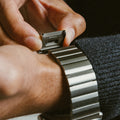


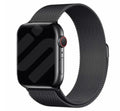


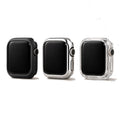

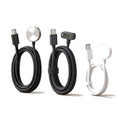

Check the back of your smartwatch
Look at the back of your watch. The model (e.g., Series 9) and the size (e.g., 45mm) are engraved around the heart rate sensor.

Choose your smartwatch
Every page then shows the straps that fit your smartwatch.
Not sure which model you have?
By brand
Series
Apple Watch
Materials & accessories
Fitbit
Garmin
Xiaomi
Polar
Coros
Withings
Nothing
Model
By material
Set up your device and see every matching product at once.
Which smartwatch do you have?
Our brands
Discover
Information
Which smartwatch do I have?
Pick your smartwatch brand
Whether a strap fits depends on the lug width and the fitting. Always pick a strap listed for your brand and model.
Which smartwatch do you have?
Elk bandje is afgestemd op jouw exacte smartwatch, dus de maat die je nodig hebt is simpelweg de bandbreedte van je smartwatch. Zo weet je het zeker.
Every brand puts the model and size somewhere else. Pick yours.
Pick your brand
Find your model
Look at the back of your watch. The model (e.g., Series 9) and the size (e.g., 45mm) are engraved around the heart rate sensor.

Find your model
On your smartwatch
In the app on your phone

Find your model
Look at the back of your watch casing. The model name (e.g., Fenix 7) is usually engraved near the charging pins or around the heart rate sensor.

On your smartwatch
In the app on your phone

Find your model
Look at the back of your watch casing. The model name (e.g., Fitbit Sense 2) is usually engraved at the back of the watch.

On your smartwatch
In the app on your phone
On the box

Find your model
Check the back of the watch casing. The model name or model number is usually also engraved there, along with other details.

On your smartwatch
In the app on your phone
On the box

Find your model
The model name is usually not printed on the watch itself. You can find it easily in your watch settings or the companion app.

On your smartwatch
In the app on your phone
On the box
Find your model
Turn your Amazfit watch over. The model name (e.g., Amazfit GTR 4, GTS 4 Mini) is usually engraved on the back casing near the sensors.

On your smartwatch
In the app on your phone
On the box

Find your model
Look at the back of your watch casing. The model name or model number is usually engraved on the back of the watch, along with other product details.

On your smartwatch
In the app on your phone
On the box

Find your model
Measure the internal width between the lugs, the small arms on your watch where the strap attaches.


Find your model
Many brands print the model name or number on the back of the watch case.


Meten hoeft niet: kies je model en elk bandje past. Ter info de gangbare bandbreedtes per merk.
Leg een zacht meetlint (of een strookje papier) om je pols, net boven het polsbotje.
Noteer de lengte in centimeters. De meeste volwassenen meten tussen 14 en 20 cm.
Kies je smartwatchmodel op onze site: elk bandje past precies op dat model en de meeste zijn verstelbaar.
Liever meten met een meetlint?
Print ons meetlint op ware grootte, knip het uit en lees je polsmaat af.
Pick the clasp on your strap and follow the steps.

Look at the inside of your strap. You will see small arrows engraved on the links indicating the direction the pins must be pushed out.

Pull the pin from the link and disconnect the necessary links using your toolkit.

Place the pin back, inserting it opposite to the arrow direction. Pointy side first, split-head end on top.

If both sides of the link have open holes, you have a spring bar system. These pins are spring-loaded.

Use a spring bar tool, if you're using our toolkit-removal, remove the screwdriver attachment first to make this easier.Gently compress the pin from either side, then slide the link out while holding the pin in.

Align the strap and use the tool to compress the pin again so it fits back into the holes. Release the pin and make sure it clicks securely into place before wearing.

Check both sides of the strap. One side of the hole will be slightly more recessed. This is where you apply pressure.

Since there are no arrows, these pins are friction-fit. Use steady, firm pressure from your link remover tool to push the pin through.

Insert the pointy side of the pin first and push it from the opposite direction of how it was removed. Ensure it clicks into place.

Lift the lever using a small tool or your finger to reveal the securing mechanism.

Slide the clasp along the band to the desired marking for your wrist.

Press the lever down firmly to lock the clasp back in place.

Locate the removable folding clasp on your strap.

Pull the latch upwards to open the clasp. Unhook and remove the link.

Repeat until ideal length is reached. Close the folding clasp until it snaps shut.

Press the push button located on the inner side of the strap link to retract the internal spring pins.

While holding the button, gently pull the link away to disconnect it. Repeat to remove the desired number of links.

Align the remaining links and push them together. You will hear a click as the spring pins lock back into place.

Milanese straps are renowned for their elegant woven mesh design and flexibility. They fit comfortably on any wrist.

The length is adjusted using the fully sliding magnetic clasp, allowing for precise sizing.

Simply slide the magnetic clasp along the mesh band until the strap sits comfortably and let the magnet snap shut.

Locate the small arrows engraved on the inside of the strap. Pull that section in the direction of the arrow and twist it upward to expose part of the connecting pin.

Slide the lower part of the strap outward, toward the side where the pin is now exposed, to separate the two link sections.

Take out as many links as needed for a comfortable fit on the wrist.

Slide the remaining strap sections back together, then twist the arrow-marked section back down to lock the pin in place.


